
There have been a number of RNS updates released by Mark and I really miss the release notes on GitHub. Is there a way to see what changes are entailed in each update? I've been downloading from PyPI.
RNS Release Notes
Started by daylight-hub ·
That's a good question. Did you check for comments on his rngit page? I think his intention was that each commit would have a story.

daylight-hub wrote:
Is there a way to see what changes are entailed in each update?
We still have github for now. If that changes I assume we'd have to pull the repo and read the changelog that way
https://github.com/markqvist/Reticulum/blob/master/Changelog.md

GitHub is left behind already. Last version there is 1.2.5, latest release is 1.3.0, can be found on Aleph Nomadnet page. a8d24177d946de4f1f0a0fe1af9a1338:/page/releases.mu`g=reticulum|r=reticulum
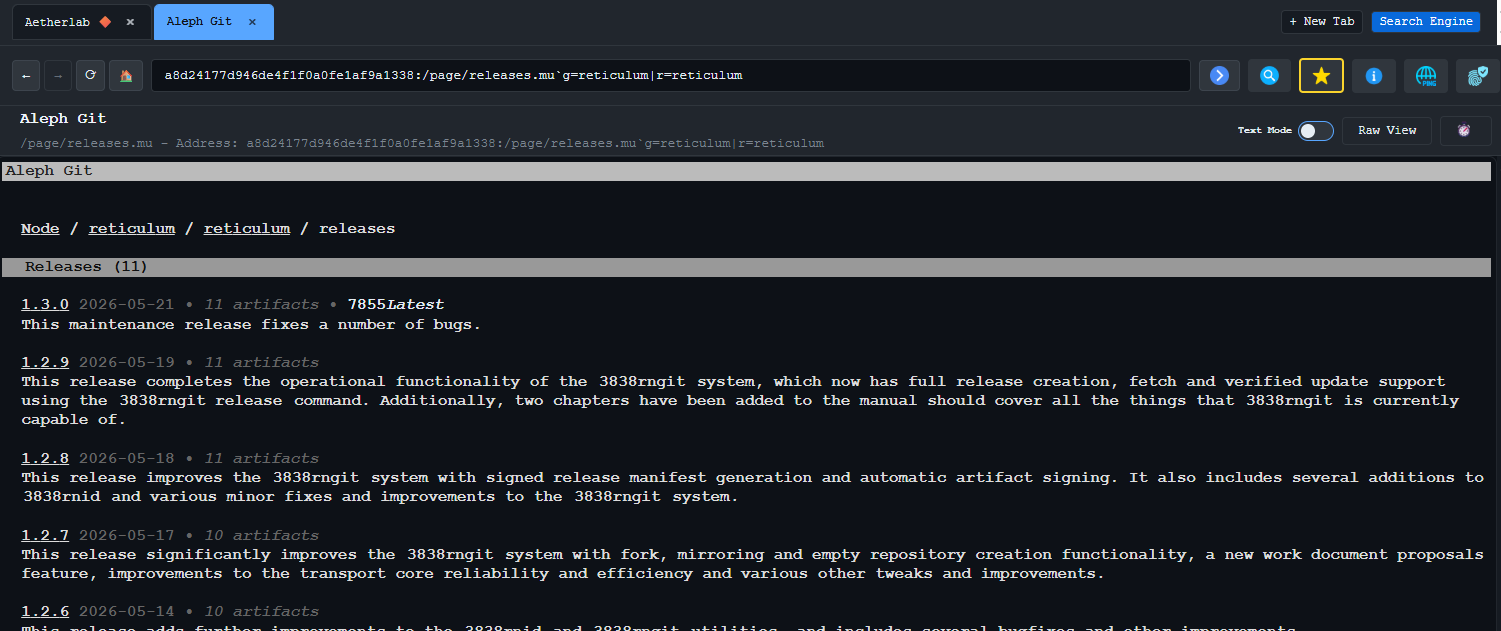
aetherlab wrote:
GitHub is left behind already.
Not exactly. Github no longer posts releases, but the files themselves as well as all the code are still updated. Including Changelog.md, which I linked and which still has all the updates listed.
Having a NomadNet source as well is nice to have though.
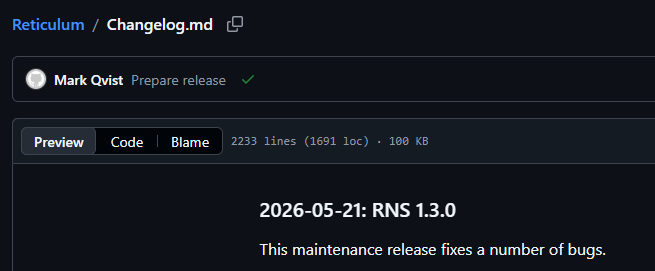

edited
#6
I'd say it's the other way around. Aleph Git is where it's at, the GitHub repo is nice to have for people who for some reason haven't gotten themselves onto NomadNet yet :)
I only use the GitHub repo for its commit feed.
List releases for a repository:
rngit release rns://7649a50d84610232d1416b41d2896aff/reticulum/reticulum list
View latest release with notes and information:
rngit release rns://7649a50d84610232d1416b41d2896aff/reticulum/reticulum view latest
Fetch latest installation .whl:
rngit release rns://7649a50d84610232d1416b41d2896aff/reticulum/reticulum fetch "latest:rns-*.whl"
Single-command update check, fetch and install:
rngit release rns://7649a50d84610232d1416b41d2896aff/reticulum/reticulum fetch "latest:rns-*.whl" && pip install ./rns-*.whl
Update using the manifest instead of URL:
rngit release ./rns_1.3.0.rsm fetch "latest:rns-*.whl" && pip install ./rns-*.whl
And as Joakim said, all the releases and release notes are browsable on Aleph as well. They will continue to be uploaded to pip as well, for the foreseeable future at least. But what I really don't like about pip is that there's no way to verify releases or check signatures. It's all basically "trust me bro, we didn't mess with the files".
I may occasionally push the code to github, but I'm considering that as a non-live mirror, so don't expect updates there to be timely or come at all. If you want to know the latest state, the Aleph node is where it's at :)
If you want to always have an in-sync copy, you can set up rngit to mirror Aleph, every 24 hours for example. You will always have a local up-to-date mirror with all the latest commits.
Also, while Changelog.md does update on github if/when I do a push to there, I didn't do that at all between 1.2.5 and 1.3.0 I think, so don't expect that to be a live source in any capapcity. If you want live release information, the rngit release list or rngit release view commands are the way to go.
There's extensive, and decently well-structure documentation on the entire rngit system in the manual now, around 30 pages in total. Should provide all the information on how to use the system. Everything is designed to be composable and can be hooked into any kind of automated workflow.
edited
#11
I made a little shell function for installing/updating Python packages with rngit.
rngit-pip-install() {
  local repo=$1
  local wheel=${2:-${repo##*/}-*.whl}
  rngit release rns://$repo fetch "latest:$wheel" && pip install ./$wheel

  # Uncomment to delete all .whl and .rsm files in the working directory:
  #rm ./*.whl ./*.rsm
}
I then have these aliases for updating RNS and NomadNet:
alias update-rns='rngit-pip-install 7649a50d84610232d1416b41d2896aff/reticulum/reticulum rns-*.whl'
alias update-nomadnet='rngit-pip-install 7649a50d84610232d1416b41d2896aff/reticulum/nomadnet'
A nice little stopgap until we have a working rnpgk :)
Edit: Updated it to support different wheel names, renamed to rngit-pip-install. Requires RNS >=1.3.0.
Edit 2: If the wildcard path matches more than one .whl file, pip will install all of them (pipx will fail if you use that). Either clean up after yourself or uncomment the rm line if you're OK with it.
That's neat Joakim! Thank's for sharing :)
Mark wrote:
List releases for a repository:
rngit release rns://7649a50d84610232d1416b41d2896aff/reticulum/reticulum listView latest release with notes and information:
rngit release rns://7649a50d84610232d1416b41d2896aff/reticulum/reticulum view latestFetch latest installation
.whl:
rngit release rns://7649a50d84610232d1416b41d2896aff/reticulum/reticulum fetch "latest:rns-*.whl"Single-command update check, fetch and install:
rngit release rns://7649a50d84610232d1416b41d2896aff/reticulum/reticulum fetch "latest:rns-*.whl" && pip install ./rns-*.whlUpdate using the manifest instead of URL:
rngit release ./rns_1.3.0.rsm fetch "latest:rns-*.whl" && pip install ./rns-*.whl
Thank you Mark. Can you explain the necessary prerequisites to using these commands. I've tried running them in the command line, but to not success. All I have is RNS and LXMF. Do I need Nomadnet? Should I first connect to a specific backbone TCP connection? Here's what I'm running into on my server:
lcs@LCS:~$ rngit release rns://7649a50d84610232d1416b41d2896aff/reticulum/reticulum list [2026-05-23 01:29:48] [Error] The "git" command is not available. Aborting server startup.
lcs@LCS:~$ rnsd --version rnsd 1.2.9
Looks like you need to install git, Daylight. rngit still uses git to do everything, it just allows it to interface with rns.
Yes, in 1.2.9 it was a hard prerequisite to have git installed. But for many of the subcommands, git is actually not necessary, so in version 1.3.0 I changed the logic, so it only checks the git requirement if actually needed. From 1.3.0 onwards, you can fetch releases, et cetera, without having git installed.
You will of course still need git for hosting repositories and such.
Mark wrote:
Yes, in 1.2.9 it was a hard prerequisite to have
gitinstalled. But for many of the subcommands,gitis actually not necessary, so in version 1.3.0 I changed the logic, so it only checks thegitrequirement if actually needed. From 1.3.0 onwards, you can fetch releases, et cetera, without havinggitinstalled.You will of course still need
gitfor hosting repositories and such.
okay, thank you for your help!
Hey all, from someone intermittently following RNS development and expansion, it might be good to explicitly point people who go to the Github page to Aleph. I just happened to stumble across this thread here, otherwise I'd have no idea where to actually find the latest and greatest.
edited
#18
Could be a good idea to add a notice at the top of future GitHub releases, pointing people to PyPi for bootstrapping RNS and Aleph Git for the latest source.
I've never been able to establish a link with 7649a50d84610232d1416b41d2896aff (though rngit works fine with other repositories), so I am not able to read release notes nor clone from rns.
That means I rely on pip for rns releases, but can not read any release notes.
I humbly request adding release notes to the pdf manual, and to pypi if theres a place for it. Thank you.
Anonymous wrote:
I've never been able to establish a link with 7649a50d84610232d1416b41d2896aff (though rngit works fine with other repositories), so I am not able to read release notes nor clone from rns.
That means I rely on pip for rns releases, but can not read any release notes.
I humbly request adding release notes to the pdf manual, and to pypi if theres a place for it. Thank you.
The GitHub mirror has the Changelog.md file https://github.com/markqvist/Reticulum/blob/master/Changelog.md but that mirror is infrequently updated
Post a Reply
Quote