
I can't get remote management to work. I installed 1.86.4 on a Heltec V3. I'm using the console.html from that release, along w/ meshchatx from your api_extensions branch. When I connect, I can see a burst of radio activity from the target node that's also received on the node that's tethered to meshchatx. but it just looks like the attached screenshot
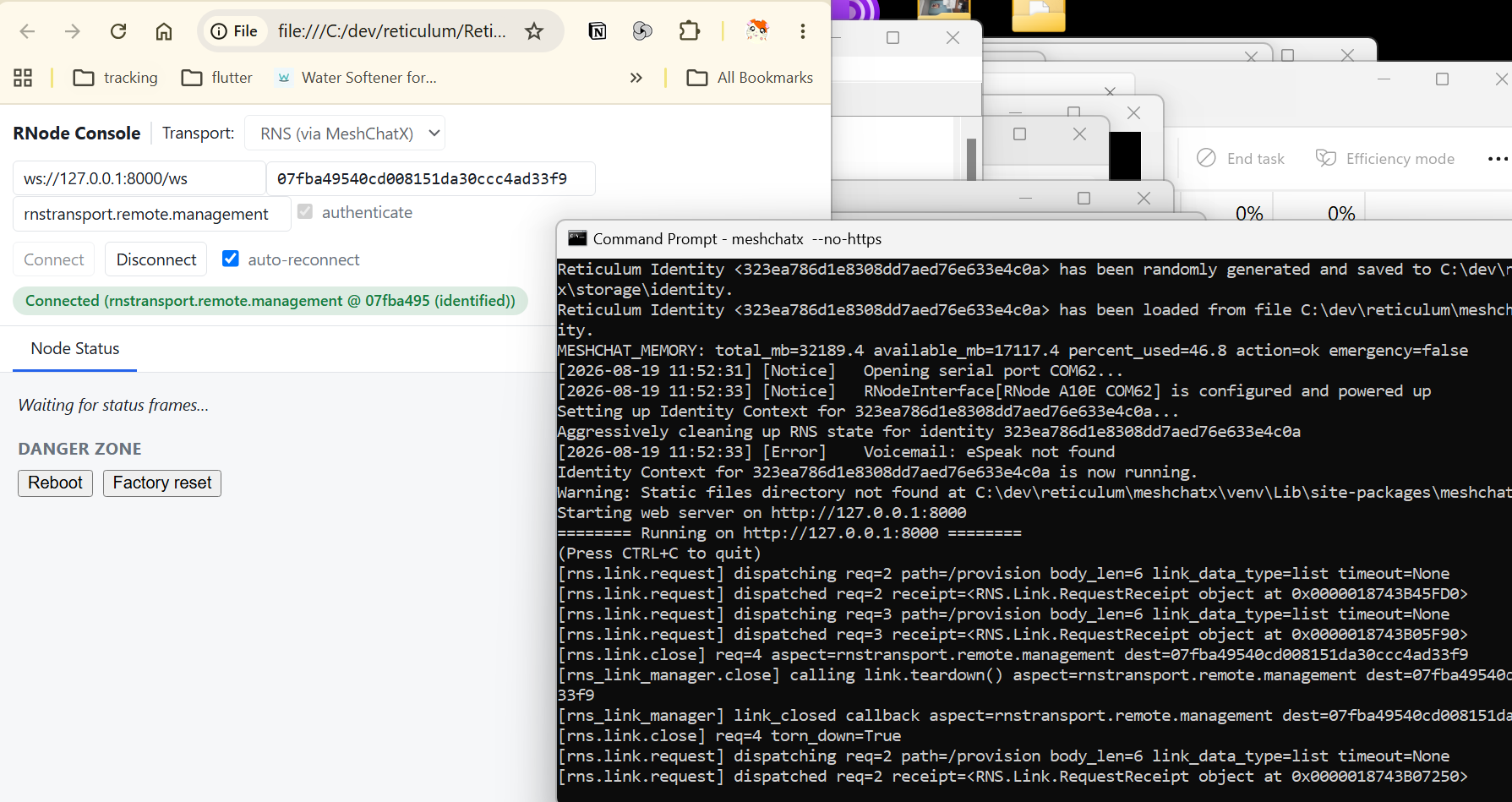
no matter how long i wait, console.html doesn't receive any data
crisprcas9 wrote:
I can't get remote management to work. I installed 1.86.4 on a Heltec V3. I'm using the console.html from that release, along w/ meshchatx from your api_extensions branch. When I connect, I can see a burst of radio activity from the target node that's also received on the node that's tethered to meshchatx. but it just looks like the attached screenshot
[image]
no matter how long i wait, console.html doesn't receive any data
I got it working with https://github.com/attermann/ReticulumAPI, followed the setup guide there, and then run it with ./ReticulumAPI/.venv/bin/rnsapid. Then connect via rnsapid with ws://localhost:8000/ws.
Anonymous wrote:
I got it working with https://github.com/attermann/ReticulumAPI, followed the setup guide there, and then run it with ./ReticulumAPI/.venv/bin/rnsapid. Then connect via rnsapid with ws://localhost:8000/ws.
can you give a link to the console.html that you used? the one in release 1.86.4 doesn't even work w/ rnsapid, and the one built from the src also has errors
Anonymous wrote:
Anonymous wrote:
I got it working with https://github.com/attermann/ReticulumAPI, followed the setup guide there, and then run it with ./ReticulumAPI/.venv/bin/rnsapid. Then connect via rnsapid with ws://localhost:8000/ws.
can you give a link to the console.html that you used? the one in release 1.86.4 doesn't even work w/ rnsapid, and the one built from the src also has errors
Well this is a bit messy. I checked my setup still works and it does, latest 1.86.4 firmware and im using the "index.html" from the "webconsole" folder in the main source. So to check again i started from scratch with the 1.86.4 release and a fresh ReticulumAPI setup and it doesn't work.. Also the webconsole/index.html and console.html are different for some reason..? Anyway I think the one I downloaded a while ago is different, here it is: https://github.com/attermann/microReticulum_Firmware/blob/73c2b178954ab08d44dfb889a6907fe2795e2157/webconsole/index.html
Anonymous wrote:
Well this is a bit messy. I checked my setup still works and it does, latest 1.86.4 firmware and im using the "index.html" from the "webconsole" folder in the main source. So to check again i started from scratch with the 1.86.4 release and a fresh ReticulumAPI setup and it doesn't work.. Also the webconsole/index.html and console.html are different for some reason..? Anyway I think the one I downloaded a while ago is different, here it is: https://github.com/attermann/microReticulum_Firmware/blob/73c2b178954ab08d44dfb889a6907fe2795e2157/webconsole/index.html
Thank you! For some stupid reason, I never thought to try index.html. It connect successfully to rnsapid, but I'm still getting timeouts from rnsapid:
2026-08-21 12:11:44,874 INFO rnsapi.server: listening on https://127.0.0.1:8000 2026-08-21 12:11:44,874 INFO rnsapi.server: listening on http://127.0.0.1:8001 2026-08-21 12:12:03,393 INFO rnsapi.server: ws connected: conn=3b48918d7f13 remote=127.0.0.1 (1 total open) 2026-08-21 12:12:03,401 INFO rnsapi.server: ws attached: conn=3b48918d7f13 session=31a353a32c300d38 anonymous=True 2026-08-21 12:12:03,412 INFO rnsapi.handlers.links: session 31a353a32c300d38 link.open received (dest=07fba49540cd008151 da30ccc4ad33f9 aspect=rnstransport.remote.management auto_identify=True) 2026-08-21 12:12:03,625 INFO rnsapi.rns.links: session 31a353a32c300d38 opening link to 07fba49540cd008151da30ccc4ad33f9 (aspect=rnstransport.remote.management) 2026-08-21 12:12:04,961 INFO rnsapi.rns.links: session 31a353a32c300d38 link 07fba49540cd008151da30ccc4ad33f9 ACTIVE (mt u=500 mdu=431) 2026-08-21 12:12:05,008 INFO rnsapi.rns.links: session 31a353a32c300d38 link 07fba49540cd008151da30ccc4ad33f9 identifyin g with default (71c2af366482e4c4be46cf09cafa61bd) identity 2026-08-21 12:12:05,016 INFO rnsapi.rns.links: session 31a353a32c300d38 link 07fba49540cd008151da30ccc4ad33f9 request /p rovision sending (data_type=list, timeout=30, link_status=ACTIVE) 2026-08-21 12:12:35,023 INFO rnsapi.rns.links: session 31a353a32c300d38 link 07fba49540cd008151da30ccc4ad33f9 request /p rovision sending (data_type=list, timeout=30, link_status=ACTIVE) 2026-08-21 12:12:40,034 INFO rnsapi.rns.links: session 31a353a32c300d38 link 07fba49540cd008151da30ccc4ad33f9 request /p rovision watchdog timeout — RNS did not fire failed_callback (known packet-request bug)
Anonymous wrote:
Anonymous wrote:
Well this is a bit messy. I checked my setup still works and it does, latest 1.86.4 firmware and im using the "index.html" from the "webconsole" folder in the main source. So to check again i started from scratch with the 1.86.4 release and a fresh ReticulumAPI setup and it doesn't work.. Also the webconsole/index.html and console.html are different for some reason..? Anyway I think the one I downloaded a while ago is different, here it is: https://github.com/attermann/microReticulum_Firmware/blob/73c2b178954ab08d44dfb889a6907fe2795e2157/webconsole/index.html
Thank you! For some stupid reason, I never thought to try index.html. It connect successfully to rnsapid, but I'm still getting timeouts from rnsapid:
2026-08-21 12:11:44,874 INFO rnsapi.server: listening on https://127.0.0.1:8000 2026-08-21 12:11:44,874 INFO rnsapi.server: listening on http://127.0.0.1:8001 2026-08-21 12:12:03,393 INFO rnsapi.server: ws connected: conn=3b48918d7f13 remote=127.0.0.1 (1 total open) 2026-08-21 12:12:03,401 INFO rnsapi.server: ws attached: conn=3b48918d7f13 session=31a353a32c300d38 anonymous=True 2026-08-21 12:12:03,412 INFO rnsapi.handlers.links: session 31a353a32c300d38 link.open received (dest=07fba49540cd008151 da30ccc4ad33f9 aspect=rnstransport.remote.management auto_identify=True) 2026-08-21 12:12:03,625 INFO rnsapi.rns.links: session 31a353a32c300d38 opening link to 07fba49540cd008151da30ccc4ad33f9 (aspect=rnstransport.remote.management) 2026-08-21 12:12:04,961 INFO rnsapi.rns.links: session 31a353a32c300d38 link 07fba49540cd008151da30ccc4ad33f9 ACTIVE (mt u=500 mdu=431) 2026-08-21 12:12:05,008 INFO rnsapi.rns.links: session 31a353a32c300d38 link 07fba49540cd008151da30ccc4ad33f9 identifyin g with default (71c2af366482e4c4be46cf09cafa61bd) identity 2026-08-21 12:12:05,016 INFO rnsapi.rns.links: session 31a353a32c300d38 link 07fba49540cd008151da30ccc4ad33f9 request /p rovision sending (data_type=list, timeout=30, link_status=ACTIVE) 2026-08-21 12:12:35,023 INFO rnsapi.rns.links: session 31a353a32c300d38 link 07fba49540cd008151da30ccc4ad33f9 request /p rovision sending (data_type=list, timeout=30, link_status=ACTIVE) 2026-08-21 12:12:40,034 INFO rnsapi.rns.links: session 31a353a32c300d38 link 07fba49540cd008151da30ccc4ad33f9 request /p rovision watchdog timeout — RNS did not fire failed_callback (known packet-request bug)
I can see remote node is sending data out, and the local node is receiving data, but rnsapid doesn't know what to do with it, apparently
Anonymous wrote:
Anonymous wrote:
Well this is a bit messy. I checked my setup still works and it does, latest 1.86.4 firmware and im using the "index.html" from the "webconsole" folder in the main source. So to check again i started from scratch with the 1.86.4 release and a fresh ReticulumAPI setup and it doesn't work.. Also the webconsole/index.html and console.html are different for some reason..? Anyway I think the one I downloaded a while ago is different, here it is: https://github.com/attermann/microReticulum_Firmware/blob/73c2b178954ab08d44dfb889a6907fe2795e2157/webconsole/index.html
Thank you! For some stupid reason, I never thought to try index.html. It connect successfully to rnsapid, but I'm still getting timeouts from rnsapid:
2026-08-21 12:11:44,874 INFO rnsapi.server: listening on https://127.0.0.1:8000 2026-08-21 12:11:44,874 INFO rnsapi.server: listening on http://127.0.0.1:8001 2026-08-21 12:12:03,393 INFO rnsapi.server: ws connected: conn=3b48918d7f13 remote=127.0.0.1 (1 total open) 2026-08-21 12:12:03,401 INFO rnsapi.server: ws attached: conn=3b48918d7f13 session=31a353a32c300d38 anonymous=True 2026-08-21 12:12:03,412 INFO rnsapi.handlers.links: session 31a353a32c300d38 link.open received (dest=07fba49540cd008151 da30ccc4ad33f9 aspect=rnstransport.remote.management auto_identify=True) 2026-08-21 12:12:03,625 INFO rnsapi.rns.links: session 31a353a32c300d38 opening link to 07fba49540cd008151da30ccc4ad33f9 (aspect=rnstransport.remote.management) 2026-08-21 12:12:04,961 INFO rnsapi.rns.links: session 31a353a32c300d38 link 07fba49540cd008151da30ccc4ad33f9 ACTIVE (mt u=500 mdu=431) 2026-08-21 12:12:05,008 INFO rnsapi.rns.links: session 31a353a32c300d38 link 07fba49540cd008151da30ccc4ad33f9 identifyin g with default (71c2af366482e4c4be46cf09cafa61bd) identity 2026-08-21 12:12:05,016 INFO rnsapi.rns.links: session 31a353a32c300d38 link 07fba49540cd008151da30ccc4ad33f9 request /p rovision sending (data_type=list, timeout=30, link_status=ACTIVE) 2026-08-21 12:12:35,023 INFO rnsapi.rns.links: session 31a353a32c300d38 link 07fba49540cd008151da30ccc4ad33f9 request /p rovision sending (data_type=list, timeout=30, link_status=ACTIVE) 2026-08-21 12:12:40,034 INFO rnsapi.rns.links: session 31a353a32c300d38 link 07fba49540cd008151da30ccc4ad33f9 request /p rovision watchdog timeout — RNS did not fire failed_callback (known packet-request bug)
I can see remote node is sending data out, and the local node is receiving data, but rnsapid doesn't know what to do with it, apparently
Is there any possibility to debug the sw without using Serial.print?
I want to look into some timing issues but i don't have much experience with esp32 debugging in particular.
edited
#49
Nomad1n0 wrote:
Is there any possibility to debug the sw without using Serial.print?
I want to look into some timing issues but i don't have much experience with esp32 debugging in particular.
Never tried it, but I'd start here: https://docs.platformio.org/en/latest/plus/debugging.html
How do I save config changes over the Web Console to the radio.
When I change e. g. NomadNet Name and save it with Save Namespace, or same with Remote Management allowed the cange is not there anymore after rebooting the device. What does the trick?
C.S.Burner wrote:
How do I save config changes over the Web Console to the radio.
When I change e. g.NomadNet Nameand save it withSave Namespace, or same withRemote Management allowedthe cange is not there anymore after rebooting the device. What does the trick?
Yeah struggled with that too.
There is a small button on the bottom right: "Commit all"
Really easy to miss with a big screen and a dark theme^^
Thanks, now it worked after scrutinizing the pages.. That was the trick I was looking for.
Post a Reply
Quote